
KYC & Verification at Kaboom77 Australia: Verification Documents, Processing Time, Withdrawal Checks & Common Issues

Last updated: 2 September 2026.
Kaboom77 KYC in Australia: the short answer
Verification at Kaboom77 is mandatory before your first payout. Until your identity is confirmed, a withdrawal request stays in pending status — even if the amount is above the minimum and the payout method is available. According to the cashier section’s published information, document checks typically take around 48–72 hours, and the first payout, including KYC, can take up to three days.
Quick facts:
- KYC is required before your first withdrawal regardless of amount; without identity confirmation, the request stays pending.
- The basic set is a valid photo ID (passport or Australian driver’s licence) plus proof of address. The operator doesn’t publish a full official document list.
- Estimated check time is 48–72 hours, though some checks clear faster.
- The name on your account must match the name on your banking documents, or the payout may be delayed or blocked.
- Minimum withdrawal is 30 AUD, account currency is AUD. Withdrawals go to PayID or a bank account; direct card withdrawal isn’t supported.
- Payouts up to roughly 2,000 AUD are more often processed automatically, while larger amounts are more likely reviewed manually.
Important: the operator doesn’t publish a guaranteed verification timeframe — 48–72 hours is a guide, not a commitment. On top of that, Kaboom77 has no confirmed gambling licence: the claimed Curaçao licence is flagged as invalid in independent checks, and ACMA doesn’t regulate this service. In practice, that means any dispute over KYC or a payout has to be resolved directly with the operator — there’s no external licensing body to step in.
When Kaboom77 may request verification
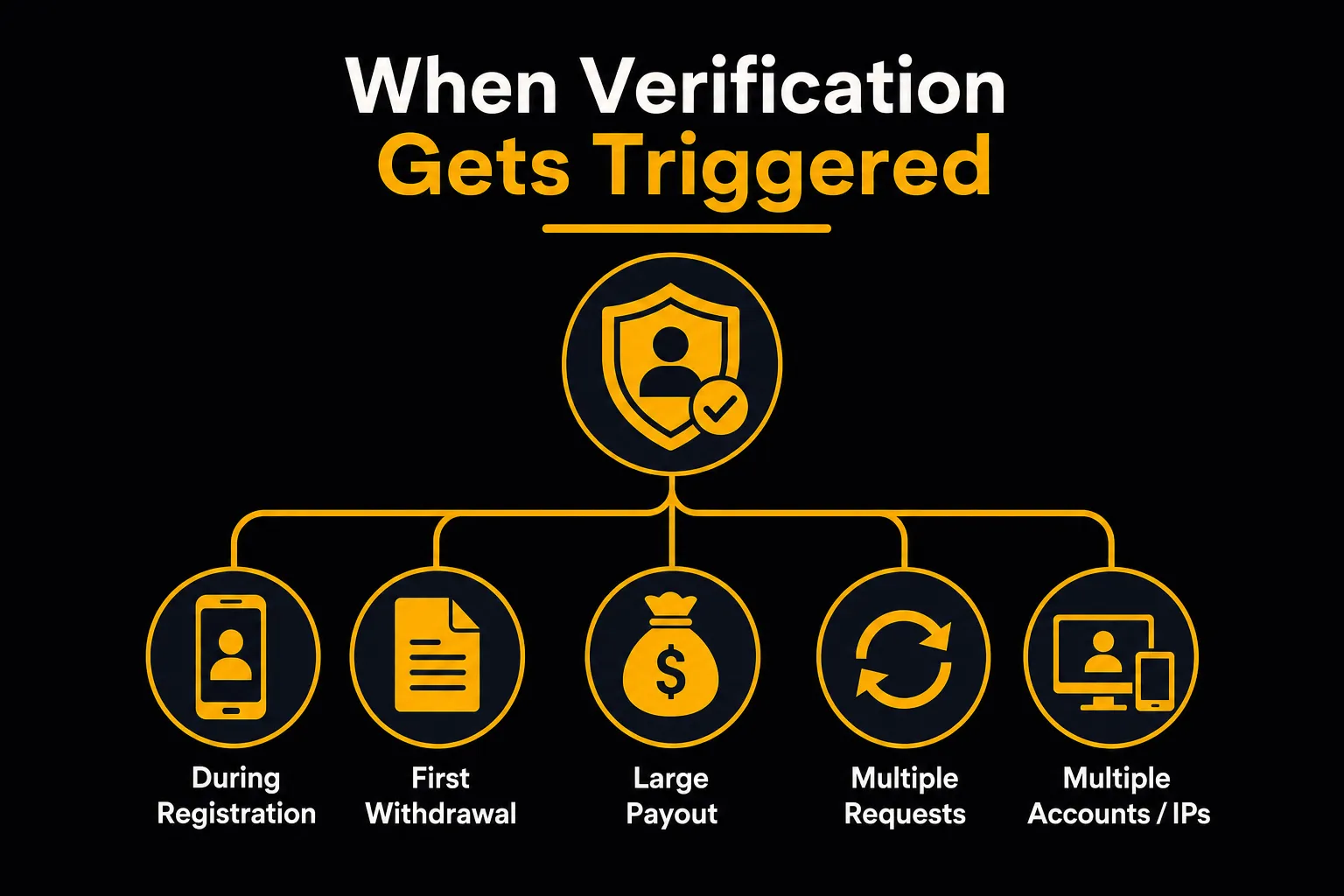
Being asked for documents doesn’t always mean something’s wrong — more often than not, it’s just a standard part of the payment process. The operator doesn’t publish a complete list of triggers, so here are the situations where a check typically shows up.
| Trigger | What’s usually requested | What it affects |
|---|---|---|
| Account registration | SMS phone number confirmation; documents usually aren’t required at this stage | Account access and deposits |
| First withdrawal request | Photo ID (passport or driver’s licence), and proof of address if needed | Without completed KYC, the request stays pending |
| Payout above roughly 2,000 AUD | Same basic document set, but the check is more often done manually | Auto-processing is replaced by a manual review queue |
| Large amount unusual for the account | Additional documents may be requested | Processing takes longer, no specific timeframe stated |
| Several withdrawal requests in a row | Account detail confirmation, payment verification | Slower request processing |
| Changing payment details or PayID | Proof of ownership of the new payment detail | Payout to the new detail is delayed until verified |
| Account recovery after losing your phone number | Documents proving you’re the account owner | Account access restored (account is tied to the phone number) |
| Signs of multiple accounts from one device or IP | Extended identity check | One account per person; winnings on a duplicate account may be frozen |
| Source of funds request | Payslip, tax notice, bank statement for a period | Unlocks a large payout |
How Kaboom77 verification works, step by step

- Check your account details against your document before uploading anything. Your full name, date of birth and phone number in your profile need to match your document and the banking details you’ll withdraw to.
- Get your files ready in advance. A valid photo ID and, if needed, proof of address with a visible issue date. That way you won’t have to scramble to upload extra files while your payout is on hold.
- Upload documents only through your account dashboard or the live chat on the official site. Don’t use any other addresses or “verification forms” you see in ads or private messages.
- Keep a record that you’ve sent everything. A screenshot of the upload screen, the date and time in AEST/AEDT, and your support chat ID. These come in handy if you need to escalate later.
- Wait for a status update without sending duplicates. Re-uploading the same files pushes your request to the back of the queue and stretches out the review.
- Reply to any follow-up request in one message. Send everything requested at once rather than piece by piece — it saves a review cycle.
- Once approved, arrange your withdrawal to a detail in your own name. Payouts go to a PayID or bank account registered under the same name as your account.
Documents for Kaboom77 verification: what’s accepted
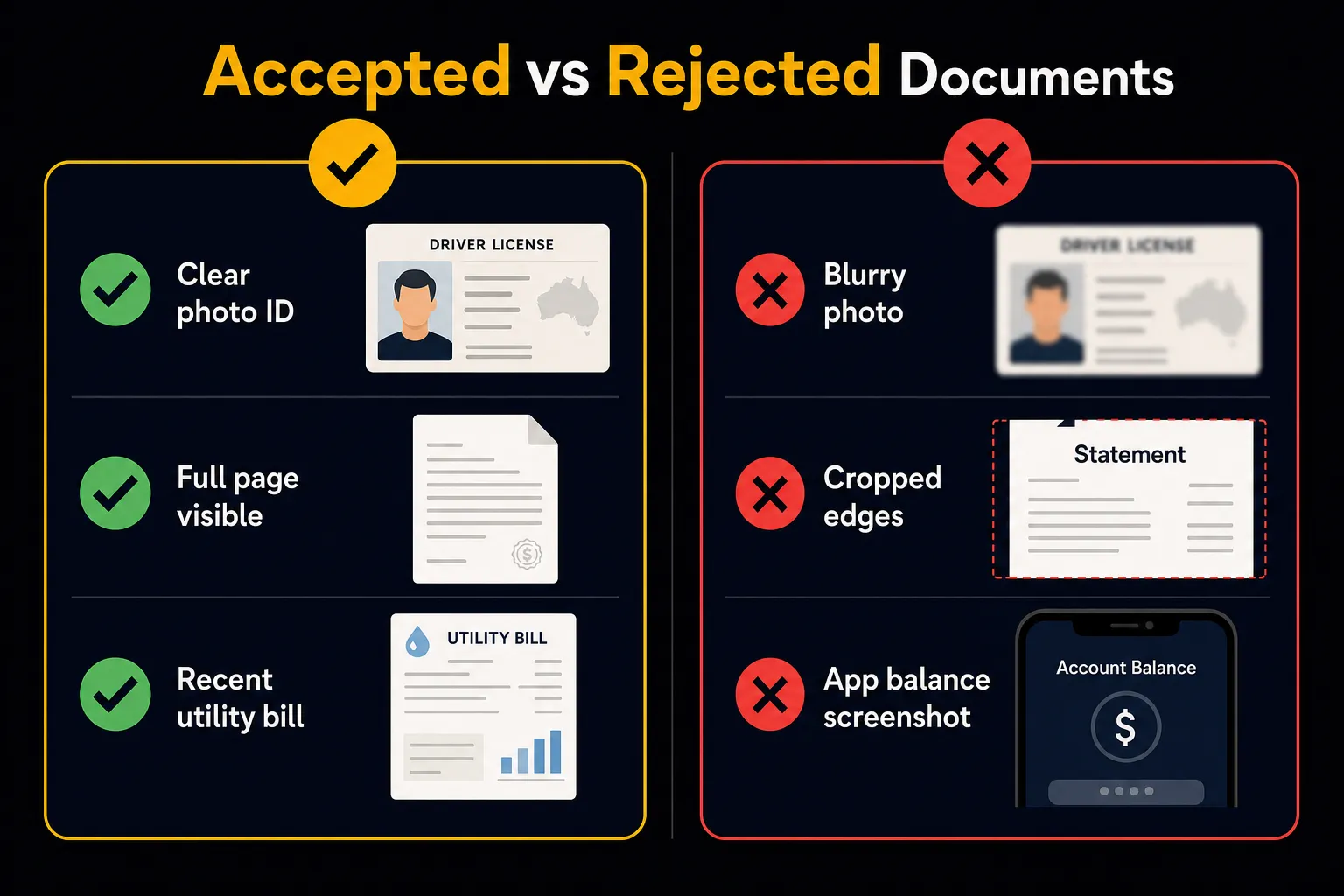
| Category | Suitable examples (Australia) | What needs to be visible | Typical validity | Common reason for rejection |
|---|---|---|---|---|
| Photo ID | Australian passport, foreign passport, AU driver’s licence (both sides) | Full name, date of birth, document number, expiry date, photo | Currently valid document | Cropped edge, glare, unreadable number |
| Proof of address | Utility bill, bank statement, phone/internet bill, council rates notice | Name, address, issue date, issuing organisation | Usually no older than 3 months | No date or address, app screenshot with no details |
| Proof of payment | PayID receipt or bank confirmation, deposit confirmation | Amount, date, recipient, transaction reference | Most recent transaction | Amount or date doesn’t match the cashier deposit |
| Source of funds | Payslip, tax notice, bank statement for a period | Name, regularity and origin of income | Only on request; no specific rules published | Partial document sent instead of the full file |
Passport
A valid Australian or foreign passport works as your primary photo ID. The photo page and machine-readable zone need to be fully visible, with no cropped corners and no glare on the lamination.
Australian driver’s licence
A driver’s licence is the other common option mentioned in verification requirements. It’s uploaded from both sides — the front confirms your name and date of birth, the back shows your address and any endorsements. An expired licence usually isn’t accepted.
Proof of address
Proof of address means documents issued by a third party: an electricity, gas, water or phone bill, a bank statement, or a council rates notice. Industry practice generally accepts these if they were issued no more than three months before upload. Personal letters, handwritten notes and contracts without issuer details don’t work for this purpose.
Bank statement as proof of address
A bank statement works if it shows the account holder’s name, address, issue date and bank name all at once. It can be submitted as a full PDF exported from internet banking. A common mistake is sending a balance screenshot from a banking app — it’s missing the address and issuer details, so it’s usually rejected.
Which account details need to match
The details that need to match are: full name, date of birth, the phone number linked to your account, address (if listed in your profile), and the name on your payment detail. A mismatch between your account name and your banking documents is one of the main reasons a payout gets delayed or blocked at the KYC stage.
File requirements: PDFs, photos and screenshots
A large share of repeat document requests come down to file quality, not content. Here’s a checklist that covers most of these rejections.
- The image is in colour — not black and white or lightened to the point where text disappears.
- All four edges of the document are visible, corners aren’t cropped, and nothing runs off the edge of the frame.
- No glare, hand shadows or blown-out lighting on the photo or the document number.
- Text is readable without zooming in: name, date of birth, number, expiry date, issue date.
- The file isn’t password-protected and doesn’t need a code to open.
- No editing, overlays, watermarks over the data, or blacked-out fields.
- The PDF contains the whole document — every page and issuer detail — not a fragment saved via “print to PDF”.
- A two-sided document is uploaded in full: both sides as separate files, or in one PDF if the form only accepts a single file.
A photo of the document is fine as long as it meets the requirements above. Screenshots are rarely accepted — they’re usually cropped at the edges and missing the issue date and organisation details. File format and size limits depend on the cashier’s current settings, which are shown in the upload form’s hint text. If the same document is rejected repeatedly with no explanation, it’s worth taking the issue to support and keeping screenshots of every status.
How long does Kaboom77 verification take?
| Scenario | Typical guide | Note |
|---|---|---|
| Standard first KYC check | Around 48–72 hours | Some checks clear faster; no guaranteed timeframe is published |
| First payout in full, including KYC | Up to 3 days | Counted from the moment of the request, not from document approval |
| Repeat document request | + one review cycle | The clock resets once the new file is uploaded |
| Large amount or source-of-funds request | No timeframe stated | Usually longer than the standard check |
| PayID payout after approved KYC | A few minutes to 24 hours | Minutes for automatic processing, hours for manual review |
The practical takeaway: plan for your first payout with a few days’ buffer rather than expecting it “on the day of the request”. Repeat payouts after your identity has been approved usually clear faster, since only the transaction itself needs checking.
How to check your verification status
Your document status shows up in your account dashboard next to the verification section, or in the cashier when you request a withdrawal. If the status doesn’t change within the expected window, you can chase it up via live chat — support is listed as available 24/7 and operates in English. When you get in touch, it helps to have your account phone number, the date you uploaded your documents, and the file type on hand.




KYC and payouts: why a request stays pending
Pending status by itself doesn’t necessarily mean there’s a problem. It can result from unfinished verification, a manual review of the amount, an unfinished bonus wagering requirement, bank-side processing, or the wrong withdrawal method being selected. The table below helps you work out what your request is actually waiting on, and when it’s time to escalate.
| What you see | Most likely cause | What to check first | Reasonable wait time | When to escalate |
|---|---|---|---|---|
| KYC status isn’t “approved”, withdrawal pending | Verification isn’t finished | Status in your dashboard, unread document request | Around 48–72 hours from upload | No document request appears and the status hasn’t changed within this window |
| KYC approved, amount up to ~2,000 AUD, waiting longer than a day | Request moved from auto-processing into the manual queue | Active bonus with unfinished wagering; several requests in a row; name match on the payment detail | Up to 24 hours via PayID | More than 24 hours with no status change |
| KYC approved, amount is large | Extra checks and manual sign-off | Whether source of funds has been requested | No timeframe stated, usually longer than standard | No answer given on a specific timeframe or document list |
| Request marked as processed, money hasn’t arrived | Processing on the bank or PayID side | Transaction reference from support, status in your banking app | Hours | A full day after this status appears |
| Withdrawal to a card won’t go through | Direct card withdrawals aren’t supported | Whether a PayID or bank account is linked | — | Straight away: switch withdrawal method |
| Same document requested again | File failed on quality or format | Rejection reason text, file requirements | One review cycle | No rejection reason is given |
The difference between these two main states matters. While a request is pending, the payment hasn’t been sent to the payment system yet, and its outcome depends on the operator. If a request is marked as processed (the exact wording in the cashier may vary, for example “processed”), the funds have already left, and the matter sits with the bank or PayID — in that case, it’s more effective to ask support for the transaction reference and check it with your own bank. Available withdrawal methods and crediting times are covered in the deposit and withdrawal methods guide. A ready-made support message template is provided below in the section on delays and rejections.
Exceptions and non-standard cases
Name doesn’t match the document. A name change after marriage, a middle name, a shortened form, or a different transliteration are typical reasons for mismatches. This is usually resolved with an extra document linking both versions of the name (marriage certificate, change-of-name document), plus correcting your profile details through support before submitting a withdrawal request.
Address doesn’t match. If you’ve recently moved, a more recent bill for your new address will do. Electronic bills are accepted if they’re a full PDF from the service provider with a date and issuer details. A document in your partner’s, parent’s or landlord’s name doesn’t count as your proof of address — a bank statement in the account holder’s name works better here.
No Australian documents available. Non-residents can use a valid foreign passport as photo ID; proof of address still needs to meet the same date and issuer requirements. The account currency stays AUD regardless of which country issued your documents.
Payout to a third party. The name-matching requirement means withdrawals can only go to the account owner’s own payment detail. Accounts belonging to relatives, friends or anyone else can’t be used — that kind of request won’t pass verification.
Crypto withdrawal. The cashier’s description mentions USDT on the TRC20 network, but current availability of this method hasn’t been independently confirmed: the confirmed withdrawal routes for Australia are PayID and bank transfer. Identity verification requirements still apply to crypto withdrawals, and the wallet address needs to be double-checked character by character — a mistaken transfer on the TRC20 network can’t be reversed.
Second account. The rule is one account per person. Matches by device and IP are detected, and winnings on a duplicate account may be frozen — verification doesn’t solve this problem.
Card withdrawal. Direct card payouts aren’t supported, so even after approved KYC, you’ll still need a PayID or bank account.
Amount doesn’t affect whether a check is needed. KYC is required before your first payout regardless of the requested amount. The only difference is in processing: payouts up to roughly 2,000 AUD more often go through automated processing, while larger amounts go to manual review.
If a document is rejected or KYC is dragging on: what to do
- Read the rejection reason and don’t re-upload the same file. Sending the exact same document again just adds another review cycle.
- Swap the document for a different one in the same category. Passport instead of a driver’s licence, a bank statement or council rates notice instead of an electricity bill. The category needs to stay the same — proof of address doesn’t replace photo ID.
- Follow the escalation order. The main confirmed channel is the live chat on the official site: it’s available 24/7 in English. If your first message doesn’t get results, follow up referencing your previous request number and upload date. Messaging accounts that turn up in third-party materials haven’t been confirmed as official operator channels, so don’t send documents there.
- Send a structured message. Here’s a template that cuts down the back-and-forth:
Subject: Verification and payout delay
Account phone number: [number]
Withdrawal request ID: [number]
Amount and withdrawal method: [amount] AUD, PayID / bank transfer
Date and time of request: [date, time, AEST/AEDT]
Documents uploaded: [document type], uploaded [date]
Current verification status: [status shown in dashboard]
Rejection reason received: [reason text or “no reason given”]
Request: please confirm exactly which document is needed and the expected timeframe to complete the check. - If the verification page or link won’t open. Try a different browser, disable ad blockers and extensions, open the cashier on mobile, then ask support for an alternative upload channel. Don’t go searching for “mirror” sites or alternative domains through search results — that’s exactly how documents end up on clone sites.
- If support doesn’t respond. Keep your chat history and status screenshots. For a payment that’s already been sent, you can ask your own bank for information using the transaction reference. Keep in mind the limitation noted above: since the operator has no confirmed licence, there’s no external licensing body involved in a dispute — you’re relying on your correspondence with support directly. If a dispute stalls completely, it may be worth reviewing the operator’s complaints process for further escalation options.
Where’s it safe to upload Kaboom77 documents?

Identity documents should only be uploaded through your account dashboard or the live chat on the official site. The connection to the site is secured with HTTPS/SSL, which protects the file transfer itself. Exactly how the operator stores uploaded documents isn’t publicly disclosed, so it’s best not to send extra copies anywhere else.
- Check the domain before uploading anything. A matching or similar-sounding brand name isn’t a guarantee: in May 2026, ACMA required Australian providers to block the Waboom77 site along with five other services, after checks showed these services were operating in breach of the Interactive Gambling Act 2001. By August 2026, the Australian blocklist register held 1,788 illegal gambling and affiliate sites.
- Don’t send documents to a “support email” or messaging app found in ads, social media or private messages. The basic Scamwatch rule is simple: don’t hand over money or personal details unless you’re sure who you’re dealing with.
- Asking follow-up questions is normal practice. The Australian Passport Office points out that if an organisation asks for your passport details, it’s reasonable to ask what they plan to do with them. Passport details are best shared only with organisations you trust and that have a legitimate need for them, since once identity data is handed over, you lose control of it.
- Act fast if your documents are compromised. If you suspect your personal details have been compromised or are being used by someone else, IDCARE is the place to get advice and support in Australia.
- No licence means fewer protections for your data and money. ACMA notes that even if a service looks legitimate, it’s unlikely to have important consumer protections in place, and Australians who use it risk losing their money.
Basic profile setup and phone number verification are covered in the getting started guide. For a broader look at account safety, see the security and player protection overview.
Pre-withdrawal checklist
- Your full name in the account matches the name on your banking documents and payment detail.
- Photo ID is currently valid, not expired.
- Proof of address was issued no more than three months before upload.
- All four edges of the document are visible in the images, text is readable, no glare.
- Files aren’t password-protected and have no edits or overlays.
- The PDF is uploaded in full, with all pages and issuer details.
- Documents are uploaded only through your dashboard or the site’s live chat.
- Your withdrawal detail is registered in the account owner’s name; card withdrawals aren’t available.
- Any active bonus has been fully wagered.
- Your request amount is at least the 30 AUD minimum, account currency is AUD.
- You’ve saved upload screenshots with date and time in AEST/AEDT; the timeframe guide is 48–72 hours.
FAQ: KYC and Kaboom77 verification
What is KYC at Kaboom77?
KYC is the process of confirming the account owner’s identity using documents. Players provide a photo ID and, if needed, proof of address, then the details are checked against the profile and payment detail. Without a completed check, a payout won’t be sent.
Is verification mandatory at Kaboom77?
Yes. KYC is required before your first payout, and documents like ID or a driver’s licence may be requested before your first withdrawal. Refusing to complete the check means your withdrawal request stays unprocessed.
When might Kaboom77 ask for verification?
Most often at your first withdrawal request. Other triggers include a large amount, several requests in a row, changing your payment detail, recovering access after losing your phone number, or signs of multiple accounts. The main triggers are listed in the table above.
Do I need to verify right after registering?
Documents aren’t requested at the registration stage — you just confirm your phone number by SMS. Still, it’s worth preparing and checking your files in advance so your first payout doesn’t get held up by a last-minute check.
Is KYC needed before my first withdrawal?
Yes, verification before your first payout is mandatory. Until your identity is confirmed, your request stays pending, no matter which withdrawal method you choose.
Can a withdrawal request stay pending while KYC isn’t finished?
Yes, that’s standard behaviour: unfinished verification is a direct cause of pending status. The diagnostic table in the payout status section helps you work out whether a specific delay is KYC-related.
What documents might be needed for Kaboom77 verification?
Generally, a valid photo ID (Australian passport, foreign passport, or an AU driver’s licence). They may also ask for proof of address, proof of payment, and, for large amounts, source-of-funds documents. The operator doesn’t publish an exhaustive official list, so it’s worth confirming the specific requirements in the cashier before submitting your request.
Is a passport accepted?
Yes, a valid passport is the main option for photo ID. The photo page needs to be fully visible, without cropped corners or glare, with a readable name, date of birth, number and expiry date.
Are Australian driver’s licences accepted?
Yes, a driver’s licence is listed among the accepted documents. It needs to be uploaded from both sides, since the back holds your address and any endorsements. Expired licences usually aren’t accepted.
What counts as proof of address?
Documents from third parties: a utility bill, phone bill, bank statement, or council rates notice. The document needs to clearly show a name, address, issue date and the issuing organisation’s name.
Can I use a bank statement as proof of address?
Yes, if it shows the account holder’s name, address, issue date and bank name together. A balance screenshot from a banking app usually doesn’t work for this — it’s missing the address and issuer details.
Which personal details need to match my Kaboom77 account?
Full name, date of birth, the phone number linked to your account, address (if listed in your profile), and the name on your payment detail. A mismatch between your name and your banking documents can delay or block a payout.
What if my name doesn’t match my account details?
Profile details are corrected through support before submitting a withdrawal request. If you’ve changed your surname, you’ll also need a document linking both name versions. More detail is in the exceptions and non-standard cases section.
What if my address doesn’t match?
Upload a more recent document showing your actual address, or update your address in your profile through support. A document in someone else’s name doesn’t count as proof of your address.
Can I upload documents as a PDF?
Yes, PDFs are accepted as long as the file opens without a password and contains the full document — all pages and issuer details. Format and size requirements are shown in the upload form’s hint text.
Why might a PDF document get rejected?
Typical reasons: a password on the file, only a fragment of the document was saved, missing issue date or organisation details, unreadable text after compression, or edits and overlays in the file. The full checklist is in the file requirements section.
Can I upload a photo of my document?
Yes, as long as the shot is in colour, sharp, free of glare and shadows, and all four edges of the document are in frame. The details need to be readable without zooming in, including the document number and expiry date.
Are screenshots accepted?
Screenshots are rarely accepted. They’re usually cropped at the edges and missing the issue date and issuer details, so they don’t pass the check. A full PDF from internet banking or a photo of the physical document works better.
What image quality is usually required?
A colour image with readable text: name, date of birth, document number, expiry or issue date. Blurring, glare, cropped corners, blacked-out fields and any edits to the content aren’t accepted.
Do all edges of the document need to be visible?
Yes. Cropped corners and edges are one of the most common rejection reasons, since the reviewer can’t confirm the document is complete. The whole document needs to fit in frame with a bit of space around it.
What if Kaboom77 asks for the same document again?
Don’t re-upload the identical file. First, find out the rejection reason, then either fix the file to meet the quality requirements or replace it with a different document from the same category.
How long does Kaboom77 verification usually take?
Roughly 48–72 hours, with some checks clearing faster. Your first payout, including KYC, can take up to three days. The operator doesn’t publish a guaranteed timeframe.
What if KYC is taking longer than expected?
Check your dashboard status and look for an unread document request, then reach out via live chat with your request number, upload date and document type. A ready-made message template is provided above.
How do I check my verification status?
Status shows up in your account dashboard’s verification section, or in the cashier when arranging a withdrawal. If it isn’t updating, you can chase it up with the 24/7 English-language support team by giving your account phone number and the date you uploaded your files.
What should I write to support about a delayed verification?
Include: your account phone number, withdrawal request ID, amount and withdrawal method, date and time in AEST/AEDT, the document type uploaded, upload date, any rejection reason received, and a request for a specific timeframe.
Can Kaboom77 ask for extra documents on a large payout?
Yes. Payouts up to roughly 2,000 AUD more often go through automatically, while larger amounts are more likely to be reviewed manually, and extra documents may be requested during that review. The operator doesn’t publish a single maximum withdrawal limit or a fixed timeframe for this kind of check.
Could I be asked to prove the source of my funds?
The operator doesn’t publish specific rules for source-of-funds checks, but this can be requested for large payouts or unusual account activity. A payslip, tax notice, or a bank statement for a period showing the player’s name and where the funds came from usually works.
Can Kaboom77 ask for proof of a previous deposit?
Yes. In that case, you’d provide a PayID receipt, bank confirmation, or transaction confirmation showing the amount, date, recipient and reference. These details need to match the deposit recorded in the cashier.
What if KYC is done but my withdrawal is still pending?
Work out exactly what the request is waiting on: a manual amount review, unfinished bonus wagering, extra documents, or bank-side processing. The diagnostic table in the “KYC and payouts” section lists reasonable wait times for each scenario.
How do I tell a KYC delay apart from normal payout processing?
Your verification status and request status are the key indicators: unfinished KYC blocks the payment from being sent, while a “processed” label means the funds are already with the bank or PayID.
What should I do if my verification document is rejected?
Read the reason, fix the specific issue (cropping, glare, password, outdated date) and upload the corrected file once. Re-sending the same document unchanged just adds an extra review cycle.
Can I swap a rejected document for another one?
Yes, within the same category: a passport instead of a driver’s licence, a bank statement instead of a utility bill. A document from a different category won’t replace the rejected one — proof of address doesn’t substitute for photo ID.
Where’s it safe to upload documents for Kaboom77 verification?
Only through your account dashboard or the site’s live chat, after checking the domain. The connection is secured with HTTPS/SSL, though how uploaded documents are stored isn’t publicly disclosed, so it’s best not to send them anywhere else.
Why shouldn’t I send KYC documents to unverified sites or addresses?
A copy of your passport or licence is enough for identity theft on its own. Passport details are best shared only with trusted organisations that have a legitimate need for them, and the Australian blocklist register includes sites with brand-lookalike names — Waboom77 being one example.
What if the verification page or link won’t load?
Try switching browsers, disabling ad blockers and extensions, trying the mobile version, then asking support for an alternative upload channel. Don’t go looking for alternative domains through search results.
What if support isn’t responding about my KYC issue?
Save your chat history and status screenshots, follow up again through live chat referencing your previous request, and contact your own bank about any bank transaction. Keep in mind that with no confirmed licence, there’s no external body to arbitrate a dispute.
Data status and responsible gambling
This information is accurate as of 2 September 2026. Timeframes, amount thresholds and document requirements are based on the cashier’s published information and may be changed by the operator without notice; the operator doesn’t publish a guaranteed verification timeframe. Kaboom77 doesn’t hold an Australian licence and isn’t regulated by ACMA, so the consumer protections that come with licensing don’t apply here.
Gambling is available to people aged 18 and over and carries a risk of losing money. Free help is available in Australia through the National Gambling Helpline on 1800 858 858 (24/7) and Gambling Help Online.